
Is there any sound more stressful to a small business owner than a constantly ringing phone? It’s the sound of opportunity, but it’s also the sound of interruption, of staff being pulled away from the customer in front of them, and—if you can’t answer it—the sound of money walking out the door. Every missed call isn’t just a missed conversation; it’s potentially lost revenue, a wasted marketing dollar, and a customer who is now calling your competitor.
If you’re overwhelmed by the daily grind of manual scheduling, frustrated by booking errors, and worried about the leads you’re losing after hours, you’re in the right place. This is not just another list of software tools. This is a strategic guide to help you, the small-to-medium business (SMB) owner, diagnose your most expensive operational pain points. We’ll demystify the technology, from simple online schedulers to advanced AI phone receptionists, and provide a clear framework for choosing the right automated solution to reclaim your time, empower your staff, and boost your bottom line.
The Hidden Costs Draining Your Business: Why Manual Booking Fails
Before we explore the solutions, it’s critical to understand the true cost of sticking with the status quo. The “way it’s always been done” is often a silent drain on your resources, profitability, and sanity. The move to automation isn’t just about adopting new tech; it’s a strategic business decision backed by government bodies like the U.S. Small Business Administration, which provides resources like the SBA Guide to Business Technology to help businesses like yours grow.
Let’s do some quick math. Imagine your average customer is worth $150 in revenue. If you miss just three potential new customer calls a day, and you’re open 20 days a month, that’s 60 missed opportunities. That’s a staggering $9,000 in lost revenue potential every single month. This isn’t an exaggeration; it’s the hidden tax of an unmanaged phone line.
Problem 1: The Revenue Leaking from Missed Calls
The modern customer expects immediacy. When they decide to book a haircut, schedule a consultation, or make a dinner reservation, their intent is high. If they call your business and get a voicemail, they don’t patiently wait for a call back—they hang up and dial the next number on their Google search. Research from business communication platform Emitrr confirms the scale of this issue, finding that more than a quarter of calls to small businesses never get answered[1].
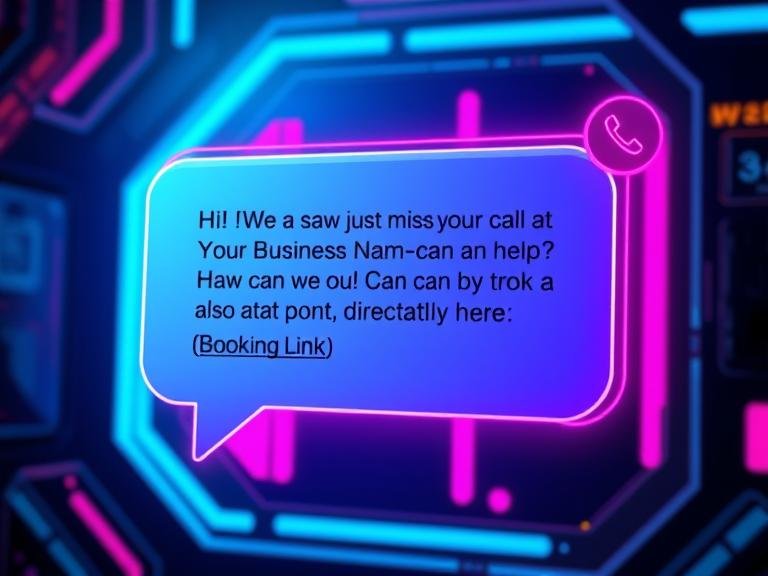
This is where automation provides an immediate, powerful fix. Instead of a missed call becoming a lost lead, an automated system can instantly engage. For example, a “missed-call-to-text” service can immediately send a message like: “Hi! We saw we just missed your call at [Your Business Name]. How can we help you? You can also book an appointment directly here: [Your Booking Link].” This simple action turns a dead end into a conversation, capturing the lead while their interest is still hot. This is precisely the kind of strategy that helps businesses solve the leaky bucket problem of lost leads.
Problem 2: Staff Burnout and the Chaos of Manual Scheduling
Your front-desk staff are the face of your business. Are they able to provide a warm, welcoming experience to the customer in front of them, or are they constantly interrupted by the phone? The administrative burden of manual scheduling is immense and leads directly to employee burnout. This includes:
- Answering the phone to book appointments.
- Manually checking calendars for availability.
- Playing “phone tag” to reschedule.
- Making reminder calls for upcoming appointments.
- Answering the same frequently asked questions (FAQs) over and over (“Where are you located?” “What are your hours?”).
This constant task-switching is inefficient and stressful. As management experts from sources like FactorialHR emphasize, effective workload management is key to productivity and employee satisfaction[2]. By automating these repetitive tasks, you free your team to focus on higher-value activities like providing excellent in-person service, upselling products, or building customer relationships—the very things that grow your business.
Workload Reduction Audit: Tasks You Can Automate Today
- New Appointment Booking
- Appointment Rescheduling & Cancellations
- Automated Appointment Reminders (via SMS/Email)
- Answering Basic FAQs (Hours, Location, Services)
- Initial Lead Intake & Qualification
- Post-Appointment Follow-ups & Review Requests
Problem 3: Human Error and the Loss of Customer Trust
To err is human, but in business, errors cost money and trust. A double-booked appointment, a client scheduled for the wrong service, or a reservation noted for the wrong day—these mistakes create chaos for your team and immense frustration for your customers. They damage your reputation and make your business seem unprofessional.
This is where the cold, calculating precision of a machine is your greatest asset. An automated booking system eliminates the most common sources of human error. When a client books a 2:00 PM slot online, that time is instantly blocked off across every platform. It’s impossible for another client or a staff member to accidentally book the same slot a minute later. The system acts as a single source of truth, ensuring your calendar is always accurate and up-to-date in real-time.

How AI Voice Booking Systems Work: A Simple Guide
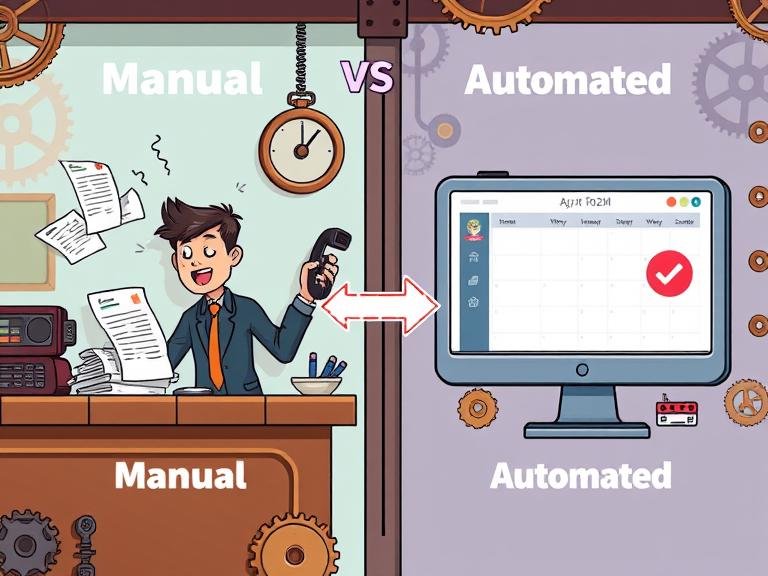
The term “AI” can sound intimidating, but the technology powering these systems is straightforward. Understanding how it works demystifies the process and builds confidence in the solution. Let’s break down the “magic” behind the curtain by comparing a manual booking to an AI-automated one.
Manual Booking Process:
- Phone Rings: Staff member stops current task to answer.
- Conversation: “Do you have any openings for a haircut on Tuesday?”
- Manual Search: Staff member puts customer on hold, pulls up a paper or digital calendar.
- Back & Forth: “Is 3 PM okay?” “No, what about 4 PM?” This continues until a time is found.
- Data Entry: Staff member manually writes or types in the name, phone number, and service. (Potential for error).
- Confirmation: Staff member verbally confirms the details.
AI-Automated Booking Process:
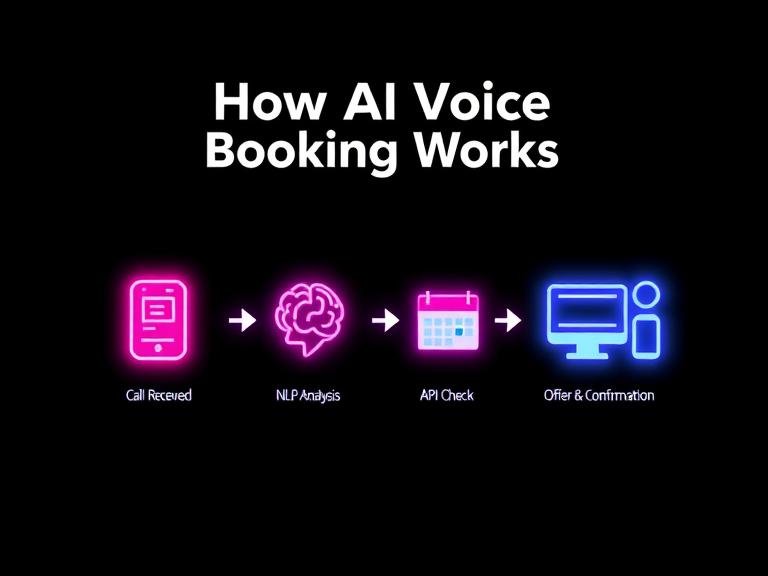
- Call Received: The AI voice assistant answers the call instantly, 24/7.
- NLP Analysis: The customer says, “I’d like to book a haircut for Tuesday afternoon.” Natural Language Processing (NLP)—the AI’s “translator”—instantly understands the intent, service, and desired time.
- Calendar API Check: The AI uses an API (Application Programming Interface)—a secure messenger—to instantly check your live calendar for all available slots on Tuesday afternoon. This process is detailed by workflow automation experts like n8n.io as a series of integrated steps[3].
- Offer & Confirmation: The AI responds, “Certainly. I have a 2:30 PM or a 4:15 PM available. Which would you prefer?” Once the client chooses, the AI books the slot and sends an automatic SMS confirmation.
The AI process is faster, error-free, and works tirelessly without needing a break, freeing your human staff for the tasks that truly require a human touch.
Finding Your Perfect Match: The Spectrum of Automation Solutions
Not every business needs a sophisticated AI to answer the phone. The right solution depends entirely on your specific problems, call volume, and budget. To find your perfect match, start by answering one question:
What is your single biggest scheduling-related problem?
- “I need a simple way for clients to book online 24/7, but my phone isn’t ringing off the hook.” -> You need a Level 1: Online Appointment Scheduler.
- “My phone rings constantly, my staff is overwhelmed, and I know we’re missing calls and losing leads.” -> You need a Level 2: AI Phone Receptionist.
Here’s a high-level comparison to guide you:
| Feature | Level 1: Online Scheduler | Level 2: AI Phone Receptionist |
|---|---|---|
| Best For | Low-to-medium call volume, high online traffic, businesses starting with automation. | High call volume, service-based businesses, teams struggling with phone interruptions. |
| Core Function | A web page where clients can see your availability and book themselves. | An AI that answers your phone, talks to clients, and books appointments for them. |
| Typical Cost | Free – $$ per month | $$ – $$$ per month |
For those looking to dive deeper into the strategy behind these choices, the HBR on Customer Service Automation provides an excellent framework for implementation.
Level 1: 24/7 Online Appointment Schedulers
This is the foundational level of booking automation. These tools provide you with a unique booking link that you can share anywhere. Customers click the link, see your real-time availability, choose a service and time, and book themselves—no phone call required. This empowers you to accept bookings 24/7, even when you’re closed.
Leading providers like Setmore, Picktime, and Square Appointments offer robust platforms, many with excellent free tiers that are perfect for small businesses[4]. Paid tiers often add advanced features like SMS reminders, payment processing, and integrations with more business tools.
Pro Tip: Your booking link is your new front door. Place it everywhere a customer might find you:
- Your website’s “Book Now” button
- Your Google Business Profile
- Your Facebook and Instagram bios
- Your email signature
- On your business cards and flyers
Level 2: The AI Phone Receptionist for Small Business
If your primary pain point is call volume, an online scheduler alone won’t solve it. This is where an AI phone receptionist becomes a game-changer. These are not the clunky “Press 1 for sales” systems of the past. Modern AI voice assistants use conversational AI to sound remarkably human and can handle complex interactions.
Cost-Benefit Analysis: AI vs. Human Receptionist
Let’s break down the math. The average salary for a full-time receptionist in the U.S. can be $35,000+ per year, plus benefits, payroll taxes, and training. That’s roughly $3,000+ per month for coverage during business hours only.
In contrast, an AI phone receptionist service from a provider like Smith.ai can cost a few hundred dollars per month[5]. For that price, you get 24/7/365 coverage, appointment booking, lead qualification, and FAQ answering. The AI never calls in sick, never takes a vacation, and can handle multiple calls at once. The return on investment is immediate and substantial.

And to answer the common question, “Will it sound robotic?”—the technology has advanced dramatically. Providers like Synthflow.ai and Bland.ai specialize in creating AI agents with natural-sounding voices, tones, and cadences[6]. Many even offer sample audio clips on their websites so you can hear the quality for yourself before committing.
Putting AI to Work: Use Cases by Industry
The power of automation is best understood through real-world application. Here’s how different types of businesses leverage these tools to solve their unique challenges.
- Salons & Spas: The biggest challenge is booking a specific service with a specific stylist. Automated appointment booking for salons is a mature market, with specialized software that manages complex staff schedules, service durations, and even room availability.Top Salon Software Comparison:
Feature Zenoti Rosy Salon Software GlossGenius[7] Target Enterprise & Multi-location Small to Mid-size Salons Independent Stylists & Booth Renters Key Strength All-in-one marketing & ops Robust scheduling & POS Sleek design & client experience - Healthcare Clinics (Dental, Chiro, etc.): The #1 problem is capturing new patient information accurately and securely while managing a complex appointment schedule. An AI booking for clinics solution can handle initial intake over the phone, asking for details and ensuring the data is entered correctly into a HIPAA-compliant system, all before a human staff member ever touches it.
- Restaurants: Managing reservations, waitlists, and fielding calls about hours or specials is a constant drain. An AI-powered restaurant booking system can handle all reservations over the phone, manage a digital waitlist by texting parties when their table is ready, and answer common questions, freeing up hosts to manage the floor.
- Home Services (Plumbing, HVAC, etc.): The key challenge is lead qualification. An AI voice assistant can answer incoming calls, ask qualifying questions (“Is this for a residential or commercial property?” “Can you describe the issue?”), and schedule a consultation with the right technician based on the answers, ensuring no lead is ever missed.
Implementation & Integration: Making It Work for You
Getting started with an automated booking system is easier than you think. The setup process generally involves “teaching” the system about your business. This is not complex coding; it’s simply configuring settings in a user-friendly interface. You’ll define your services and their durations, set the working hours for each staff member, input standard answers to your most common FAQs, and configure your booking rules (e.g., “require 24 hours’ notice for cancellations”).
To help you choose the right partner, here are key questions to ask any provider:
Provider Questions Checklist:
- What is your pricing model (per month, per call, per user)?
- Do you offer a free trial?
- How do you integrate with my existing calendar (Google, Outlook, etc.)?
- Can I customize the AI’s script or the online booking page?
- What are your security and data privacy policies? (Especially important for healthcare).
- What kind of customer support do you offer during setup and beyond?
Connecting to Your Calendar: The Google Calendar Guide
For most small businesses, Google Calendar is the heart of their schedule. Seamless integration is non-negotiable. Luckily, you have two great options to integrate booking with Google Calendar.
The Easy Way: Using Google’s Built-in Scheduler
Google now offers its own appointment scheduling feature directly within Google Calendar for many account types[8]. You can create a public booking page, set your availability, and share a link. When someone books, the event appears on your calendar automatically. This is a fantastic, no-cost starting point for solo entrepreneurs or simple businesses. You can find instructions on Google’s official support pages.
The Flexible Way: Connecting a Third-Party Tool
For more complex needs (like managing multiple staff, accepting payments, or sending customized reminders), a dedicated third-party tool like Setmore or Calendly is superior. During setup, you simply grant the tool permission to access your Google Calendar. From then on, the sync is automatic and two-way:
- A new booking in the tool instantly creates an event in your Google Calendar.
- A personal event you add to your Google Calendar instantly makes you unavailable in the booking tool.
This ensures you are never double-booked and your availability is always accurate.
Addressing Security and Data Privacy
Handing customer interactions over to an AI naturally raises questions about security. Reputable providers take this very seriously. They use data encryption to protect information both in transit and at rest. Many platforms are designed to be compliant with regulations like HIPAA for healthcare data or GDPR for customer data in Europe. When evaluating providers, look for transparency around their security protocols. Features like the 99.99% uptime advertised by Bland AI also signal a commitment to reliability and professional service[6].
The Future of Customer Interaction: What’s Next for Voice AI?
The technology we’ve discussed is just the beginning. The future of AI voice booking is moving from reactive to proactive. As highlighted by conversation intelligence leaders like Invoca, the trend is toward deeper, more personalized interactions[9].
Imagine an AI that not only books a customer’s next haircut but, based on their history, proactively texts them six weeks later saying, “Hi Sarah, it’s been about six weeks since your last appointment at The Style Room. Would you like to book your next trim for sometime next week?” This level of personalized, automated outreach will build loyalty and drive revenue in ways that are impossible to manage manually at scale.
Conclusion
The journey from being chained to your phone to running a fully optimized, automated business is a strategic one. It starts by recognizing the real, quantifiable costs of your current process—the lost revenue from missed customer calls, the drain of staff workload, and the erosion of trust from human error in booking.
By understanding the spectrum of solutions, from a simple 24/7 automated booking page to a sophisticated AI phone receptionist, you can make an informed choice that fits your unique needs. Implementing an AI voice booking or scheduling system is not just a technology upgrade; it’s a fundamental investment in your business’s efficiency, your team’s well-being, your customers’ experience, and your future growth.
Ready to stop losing revenue to your voicemail? Use the “Cost of a Missed Call” framework we discussed to calculate your potential gains, and use our “Provider Questions Checklist” to start your search with confidence.
The information provided is for educational purposes. Specific software pricing and features are subject to change. This article may contain affiliate links, which help support our research at no extra cost to you.
Sources & References
- Emitrr. (N.D.). How to Respond to a Missed Call from a Customer?. Emitrr Blog. Retrieved from https://emitrr.com/blog/how-to-respond-to-a-missed-call/
- FactorialHR. (N.D.). 10 tips for effective workload management. FactorialHR Blog. Retrieved from https://factorialhr.co.uk/blog/10-tips-for-effective-workload-management/
- n8n.io. (N.D.). Voice-based Appointment Booking System with ElevenLabs AI and Cal.com. n8n.io Workflows. Retrieved from https://n8n.io/workflows/5670-voice-based-appointment-booking-system-with-elevenlabs-ai-and-calcom/
- Sourced from feature sets of Setmore.com, Picktime.com, and Squareup.com. (2025).
- Smith.ai. (N.D.). The Business Case for an AI + Virtual Receptionist Service. Smith.ai Blog. Retrieved from https://smith.ai/blog/the-business-case-for-ai-virtual-receptionist
- Sourced from feature sets and marketing materials of Synthflow.ai and Bland.ai. (2025).
- Sourced from feature sets of Zenoti.com, Rosysalonsoftware.com, and Glossgenius.com. (2025).
- Google. (N.D.). Use Google Calendar appointment schedules. Google Calendar Help. Retrieved from https://support.google.com/calendar/answer/10729749?hl=en
- Invoca. (N.D.). 12 Examples of AI in the Contact Center. Invoca Blog. Retrieved from https://www.invoca.com/blog/examples-ai-contact-center
Leave a Reply